Tutorial 2: Using neurocaps.analysis.CAP#
The CAP class is designed to perform CAP analyses (on all subjects or group of subjects). It offers the flexibility
to analyze data from all subjects or focus on specific groups, compute CAP-specific metrics, and generate visualizations
to aid in the interpretation of results.
Performing CAPs on All Subjects#
import numpy as np
from neurocaps.analysis import CAP

# Extracting timseries
parcel_approach = {"Schaefer": {"n_rois": 100, "yeo_networks": 7, "resolution_mm": 2}}

# Simulate data for example
subject_timeseries = {str(x): {f"run-{y}": np.random.rand(100, 100) for y in range(1, 4)} for x in range(1, 11)}

# Initialize CAP class
cap_analysis = CAP(parcel_approach=parcel_approach)

# Get CAPs
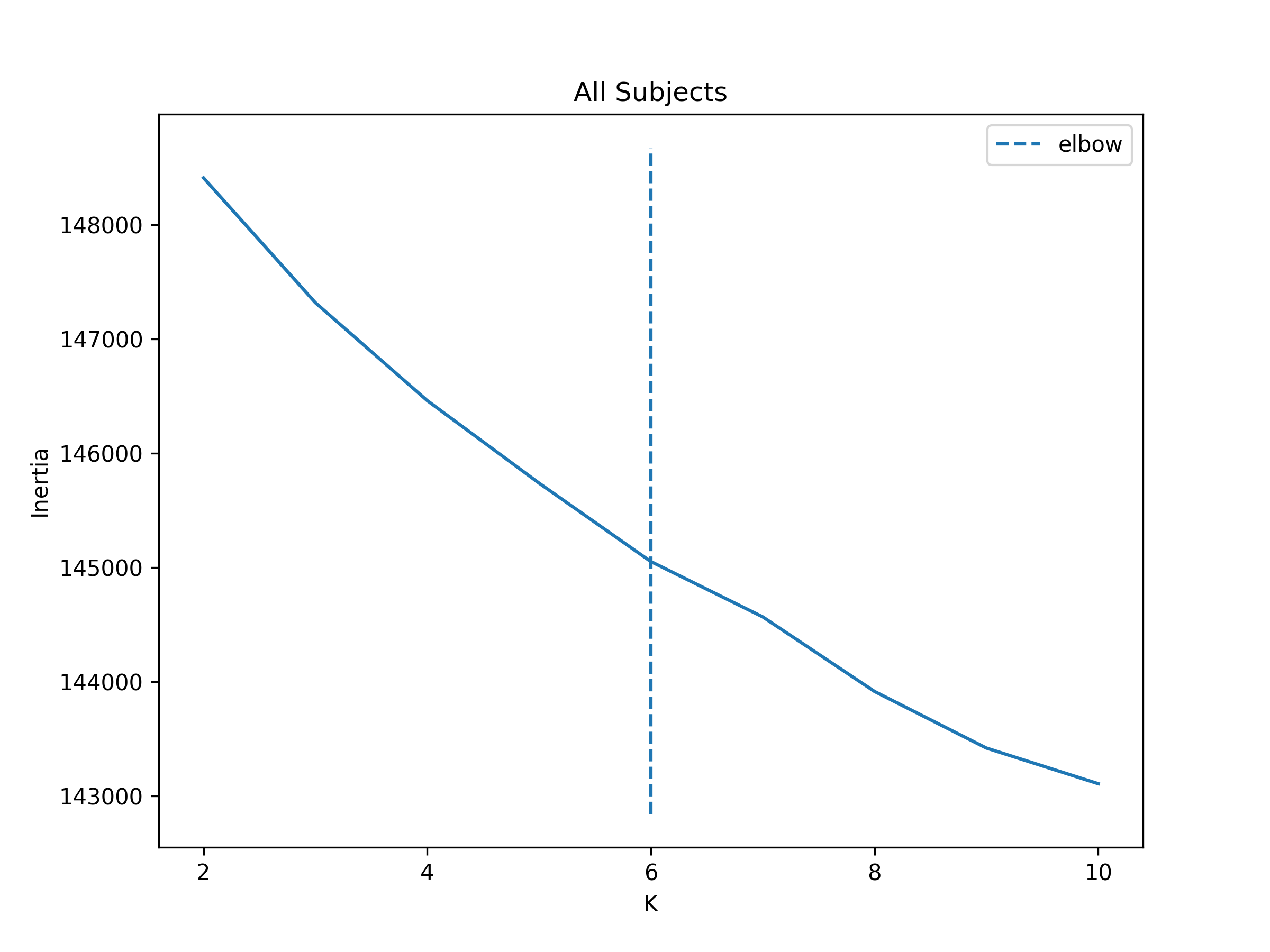
cap_analysis.get_caps(
    subject_timeseries=subject_timeseries,
    n_clusters=range(2, 11),
    cluster_selection_method="elbow",
    show_figs=True,
    step=2,
    progress_bar=True,  # Available in versions >= 0.21.5
)
Clustering [GROUP: All Subjects]: 100%|████████████████████████████████████████████████████████████████████████████████████████████████████████████████████████████| 9/9 [00:00<00:00, 20.38it/s]
2025-01-31 13:28:43,571 neurocaps.analysis.cap [INFO] [GROUP: All Subjects | METHOD: elbow] Optimal cluster size is 6.
Performing CAPs on Groups#
cap_analysis = CAP(groups={"A": ["1", "2", "3", "5"], "B": ["4", "6", "7", "8", "9", "10"]})

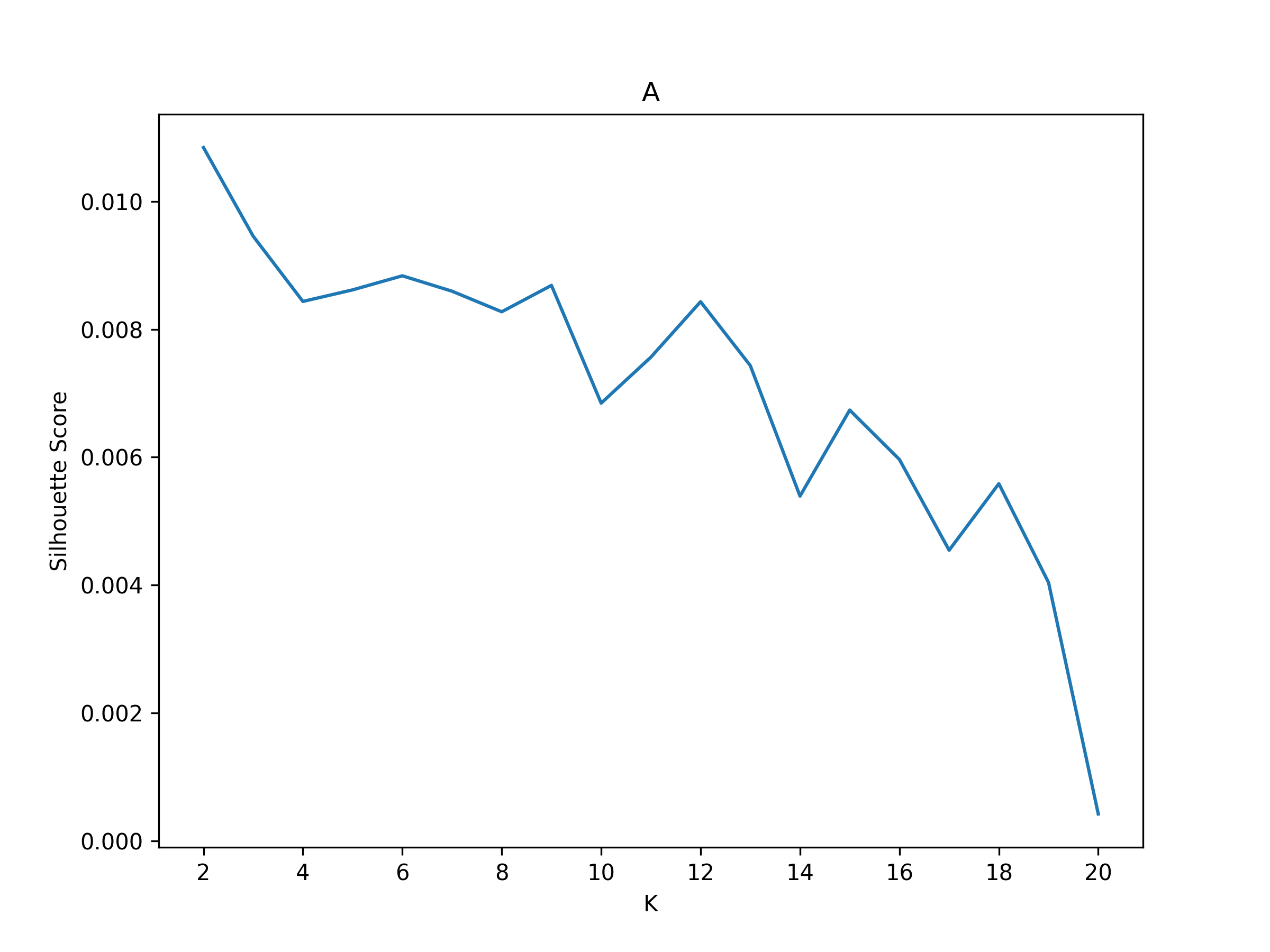
cap_analysis.get_caps(
    subject_timeseries=subject_timeseries,
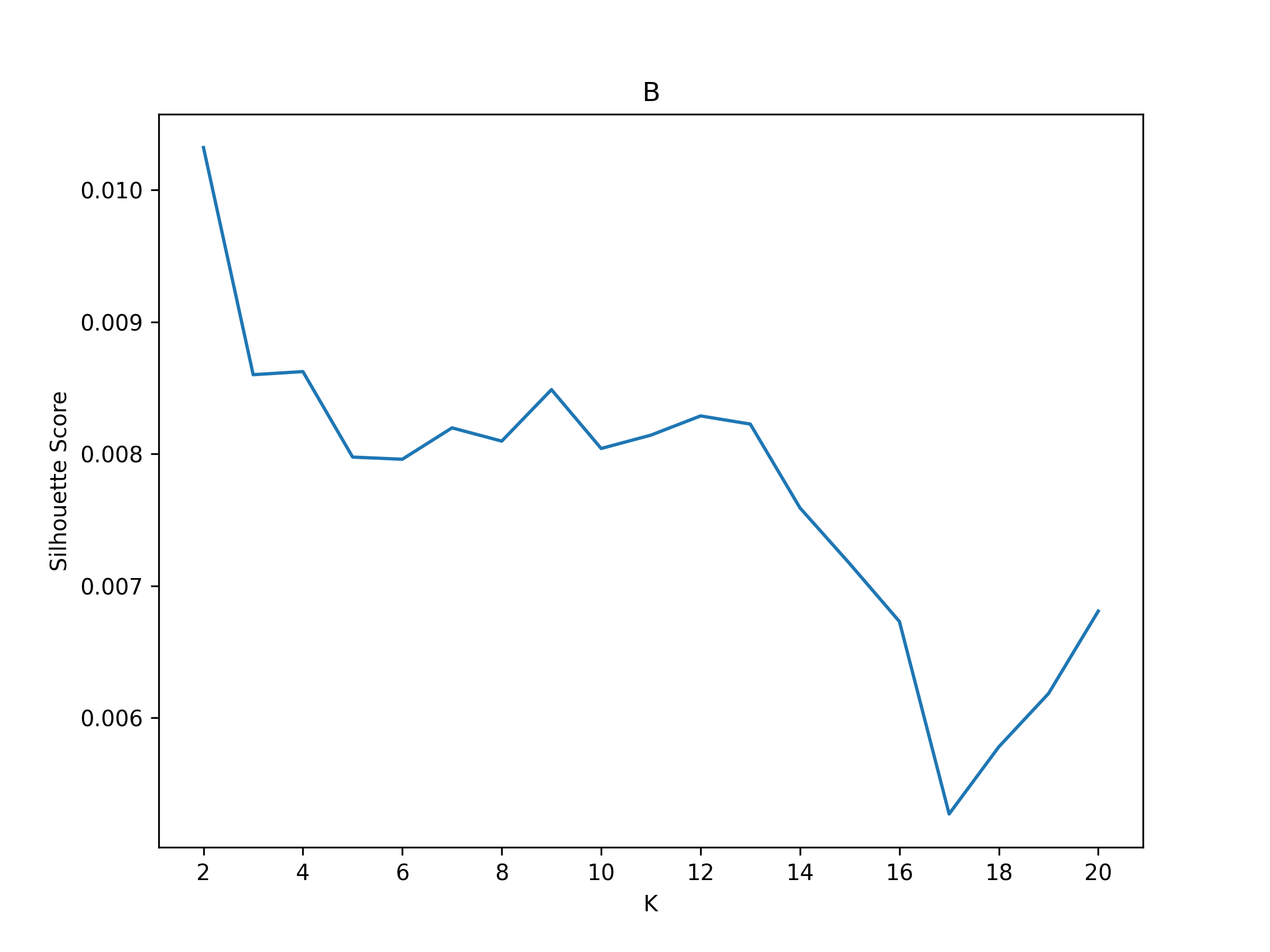
    n_clusters=range(2, 21),
    cluster_selection_method="silhouette",
    show_figs=True,
    step=2,
    progress_bar=True,
)
Clustering [GROUP: A]: 100%|█████████████████████████████████████████████████████████████████████████████████████████████████████████████████████████████████████| 19/19 [00:01<00:00, 18.71it/s]
2025-01-31 13:29:54,234 neurocaps.analysis.cap [INFO] [GROUP: A | METHOD: silhouette] Optimal cluster size is 2.
Clustering [GROUP: B]: 100%|█████████████████████████████████████████████████████████████████████████████████████████████████████████████████████████████████████| 19/19 [00:01<00:00, 12.48it/s]
2025-01-31 13:29:57,757 neurocaps.analysis.cap [INFO] [GROUP: B | METHOD: silhouette] Optimal cluster size is 2.
Calculate Metrics#
df_dict = cap_analysis.calculate_metrics(
    subject_timeseries=subject_timeseries,
    return_df=True,
    metrics=["temporal_fraction", "counts", "transition_probability"],
    continuous_runs=True,
    progress_bar=True,
)

print(df_dict["temporal_fraction"])
Computing Metrics for Subjects: 100%|███████████████████████████████████████████████████████████████████████████████████████████████████████████████████████████| 10/10 [00:00<00:00, 159.78it/s]
Subject_ID |
Group |
Run |
CAP-1 |
CAP-2 |
|---|---|---|---|---|
1 |
A |
run-continuous |
0.5066666666666667 |
0.49333333333333335 |
2 |
A |
run-continuous |
0.5333333333333333 |
0.4666666666666667 |
3 |
A |
run-continuous |
0.6 |
0.4 |
5 |
A |
run-continuous |
0.54 |
0.46 |
4 |
B |
run-continuous |
0.41333333333333333 |
0.5866666666666667 |
6 |
B |
run-continuous |
0.47333333333333333 |
0.5266666666666666 |
7 |
B |
run-continuous |
0.44 |
0.56 |
8 |
B |
run-continuous |
0.5 |
0.5 |
9 |
B |
run-continuous |
0.4866666666666667 |
0.5133333333333333 |
10 |
B |
run-continuous |
0.46 |
0.54 |
Plotting CAPs#
import seaborn as sns

cap_analysis = CAP(parcel_approach=extractor.parcel_approach)

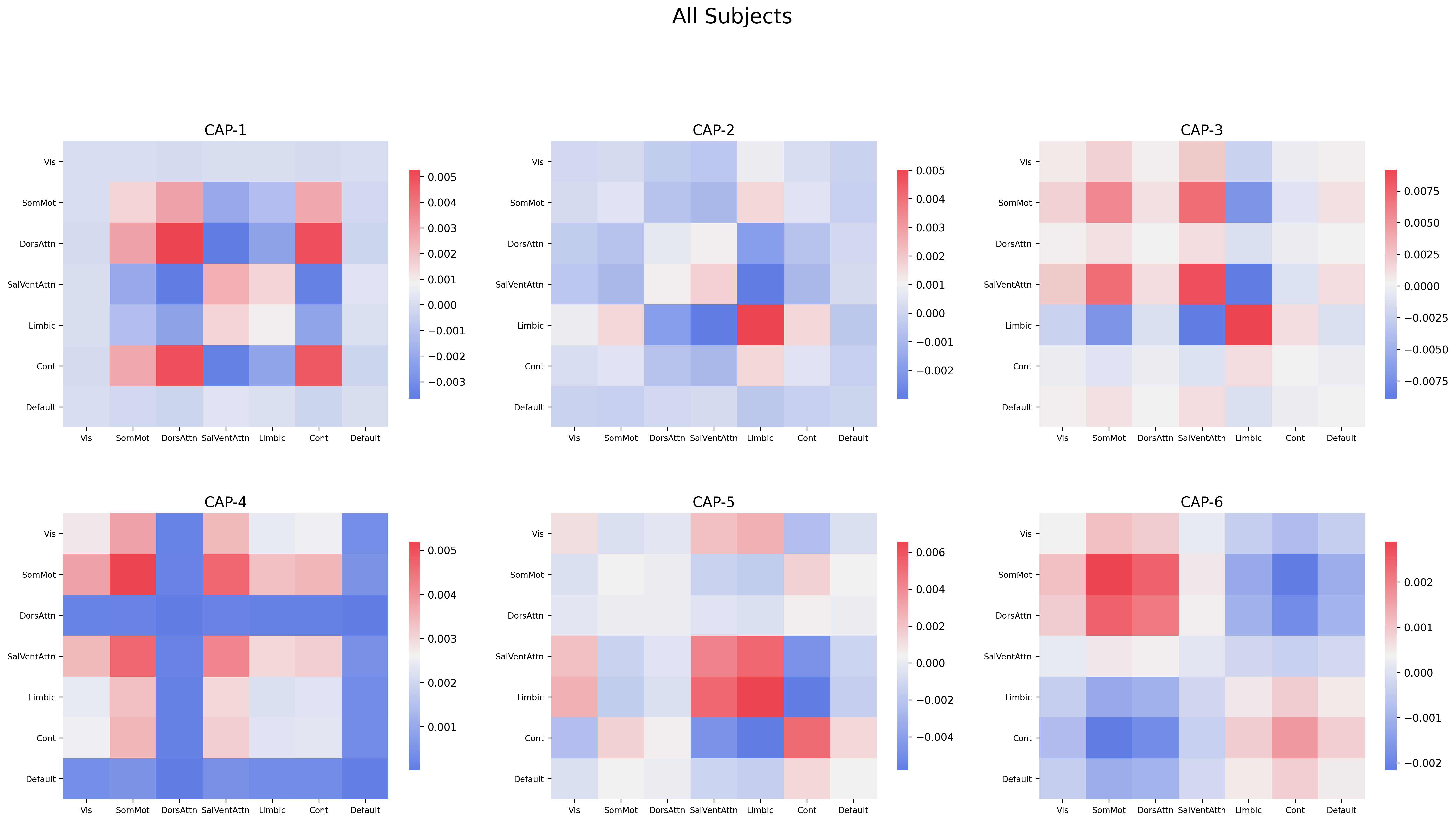
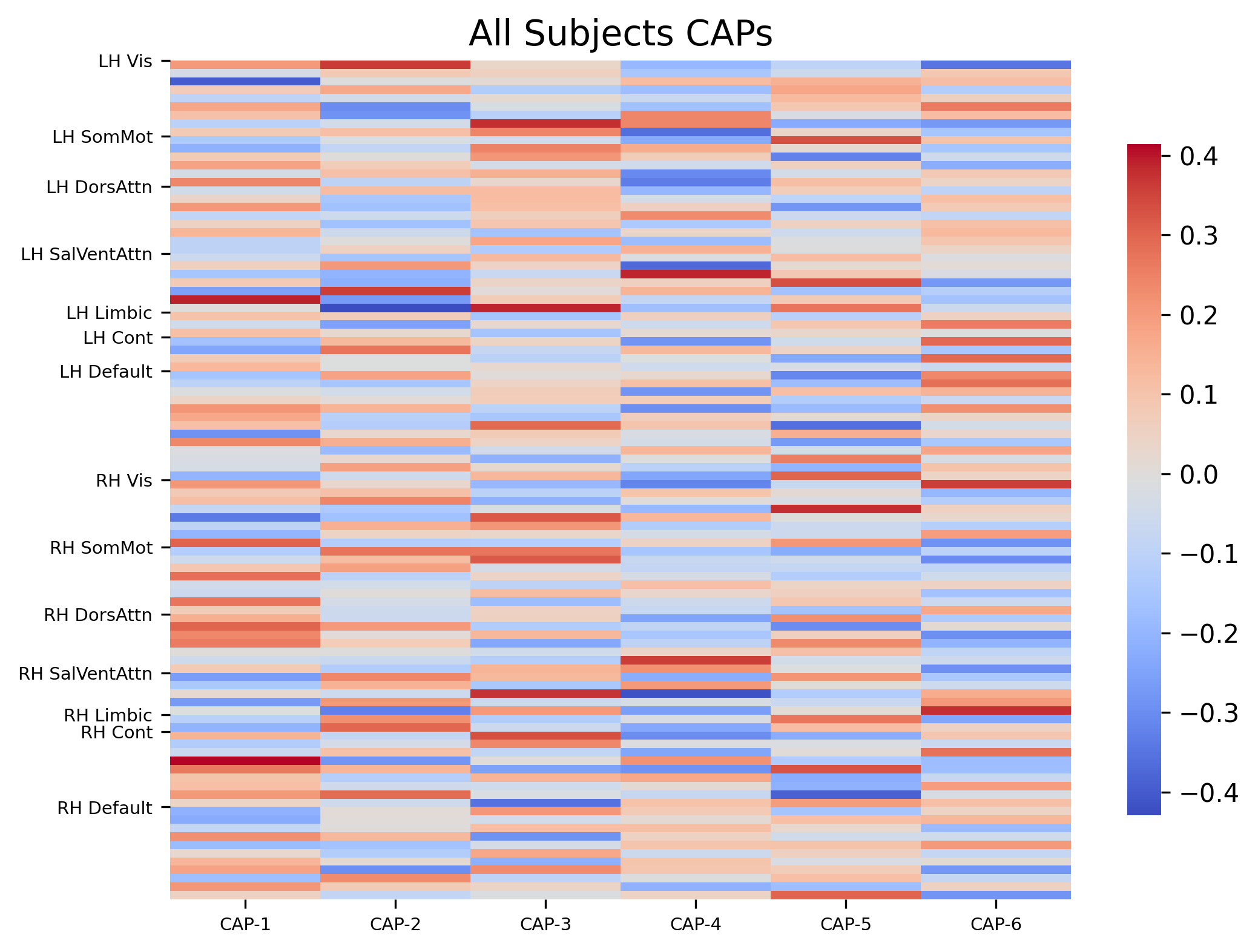
cap_analysis.get_caps(subject_timeseries=subject_timeseries, n_clusters=6)

sns.diverging_palette(145, 300, s=60, as_cmap=True)

palette = sns.diverging_palette(260, 10, s=80, l=55, n=256, as_cmap=True)

kwargs = {
    "subplots": True,
    "fontsize": 14,
    "ncol": 3,
    "sharey": True,
    "tight_layout": False,
    "xlabel_rotation": 0,
    "hspace": 0.3,
    "cmap": palette,
}

cap_analysis.caps2plot(visual_scope="regions", plot_options="outer_product", show_figs=True, **kwargs)
cap_analysis.caps2plot(
    visual_scope="nodes", plot_options="heatmap", xticklabels_size=7, yticklabels_size=7, show_figs=True
)
Generate Pearson Correlation Matrix#
cap_analysis.caps2corr(annot=True, cmap="viridis", show_figs=True)
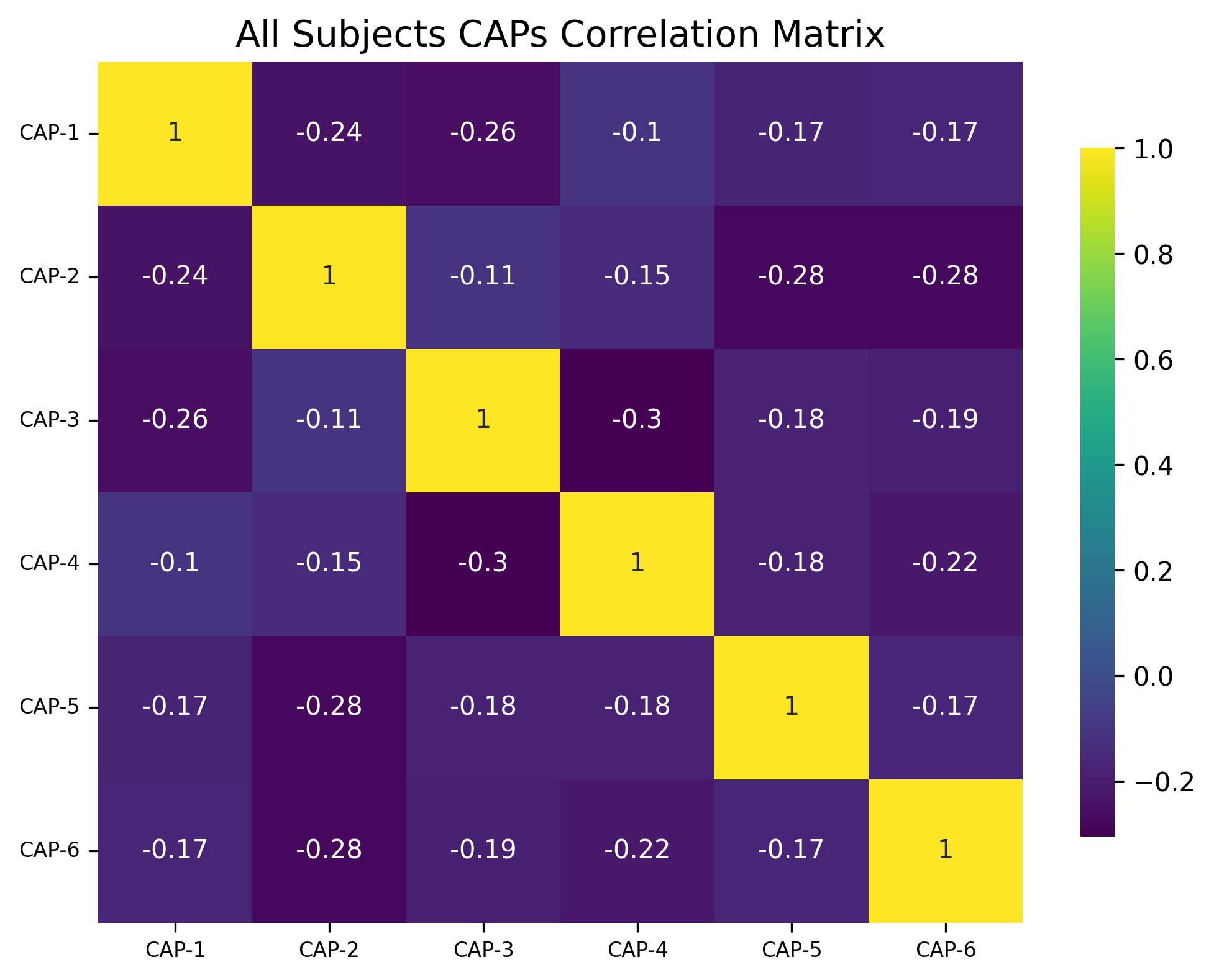
corr_dict = cap_analysis.caps2corr(return_df=True)
print(corr_dict["All Subjects"])
CAP-1 |
CAP-2 |
CAP-3 |
CAP-4 |
CAP-5 |
CAP-6 |
|
|---|---|---|---|---|---|---|
CAP-1 |
1 (0)*** |
-0.24 (0.016)* |
-0.26 (0.01)* |
-0.1 (0.3) |
-0.17 (0.087) |
-0.17 (0.09) |
CAP-2 |
-0.24 (0.016)* |
1 (0)*** |
-0.11 (0.28) |
-0.15 (0.14) |
-0.28 (0.0051)** |
-0.28 (0.0055)** |
CAP-3 |
-0.26 (0.01)* |
-0.11 (0.28) |
1 (0)*** |
-0.3 (0.0021)** |
-0.18 (0.075) |
-0.19 (0.058) |
CAP-4 |
-0.1 (0.3) |
-0.15 (0.14) |
-0.3 (0.0021)** |
1 (0)*** |
-0.18 (0.076) |
-0.22 (0.028)* |
CAP-5 |
-0.17 (0.087) |
-0.28 (0.0051)** |
-0.18 (0.075) |
-0.18 (0.076) |
1 (0)*** |
-0.17 (0.089) |
CAP-6 |
-0.17 (0.09) |
-0.28 (0.0055)** |
-0.19 (0.058) |
-0.22 (0.028)* |
-0.17 (0.089) |
1 (0)*** |
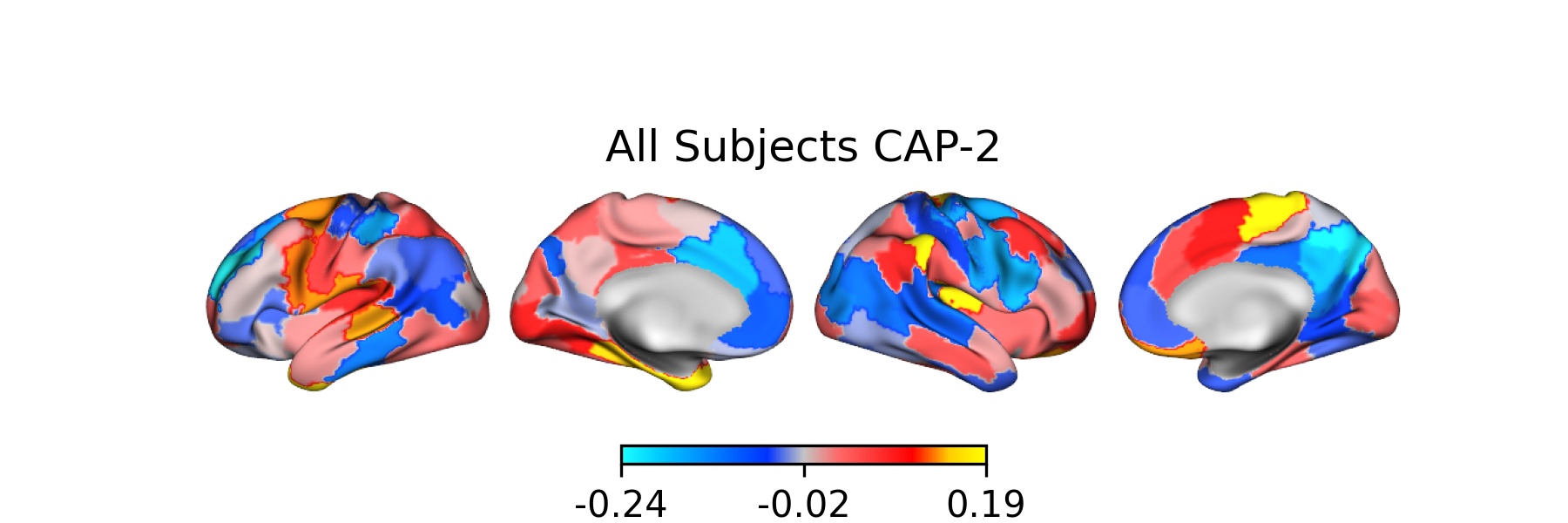
Creating Surface Plots#
from matplotlib.colors import LinearSegmentedColormap

# Create the colormap
colors = [
    "#1bfffe",
    "#00ccff",
    "#0099ff",
    "#0066ff",
    "#0033ff",
    "#c4c4c4",
    "#ff6666",
    "#ff3333",
    "#FF0000",
    "#ffcc00",
    "#FFFF00",
]

custom_cmap = LinearSegmentedColormap.from_list("custom_cold_hot", colors, N=256)

# Apply custom cmap to surface plots
cap_analysis.caps2surf(progress_bar=True, cmap=custom_cmap, size=(500, 100), layout="row")
Generating Surface Plots [GROUP: A]: 100%|█████████████████████████████████████████████████████████████████████████████████████████████████████████████████████████| 2/2 [00:07<00:00, 3.91s/it]
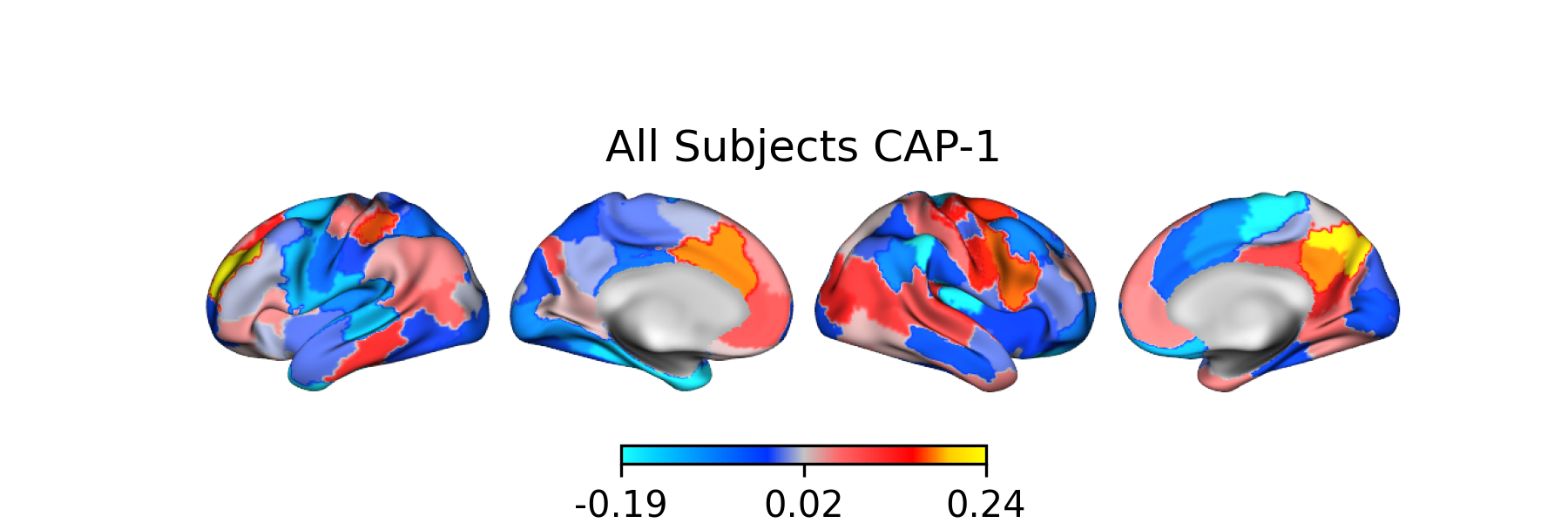
Generating Surface Plots [GROUP: B]: 100%|█████████████████████████████████████████████████████████████████████████████████████████████████████████████████████████| 2/2 [00:04<00:00, 2.12s/it]
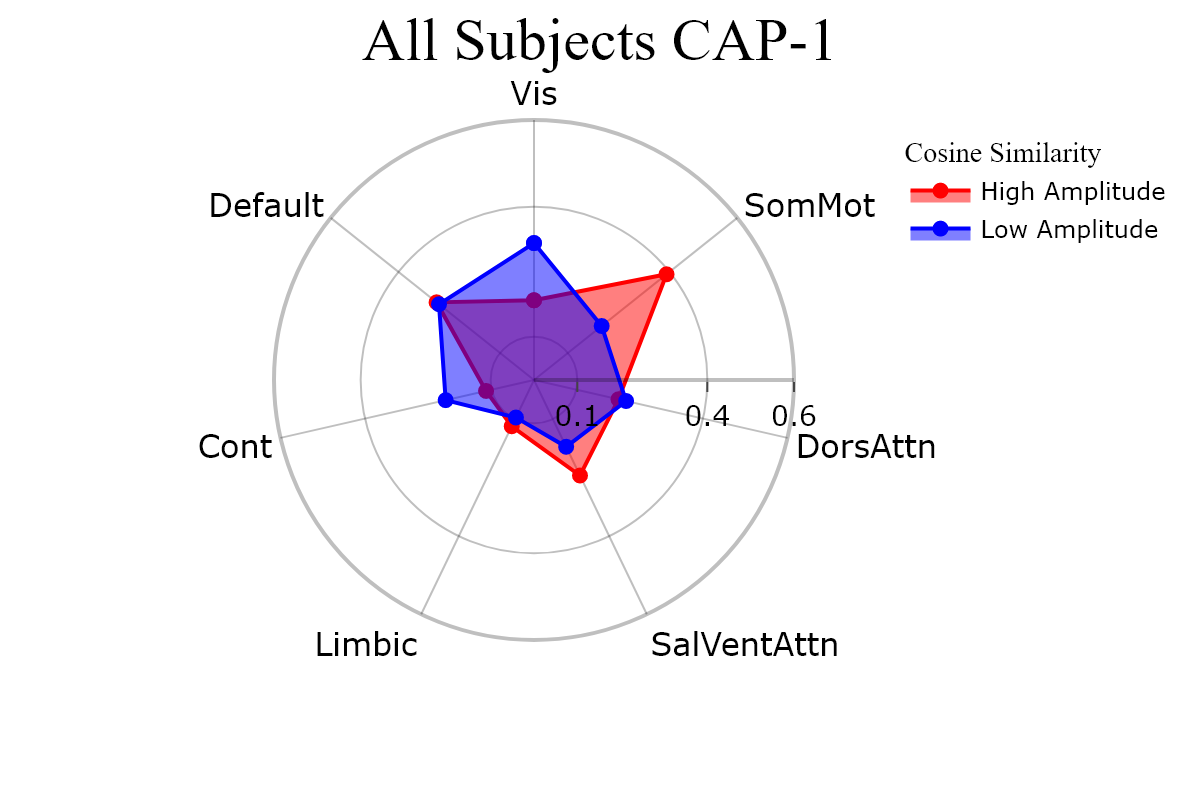
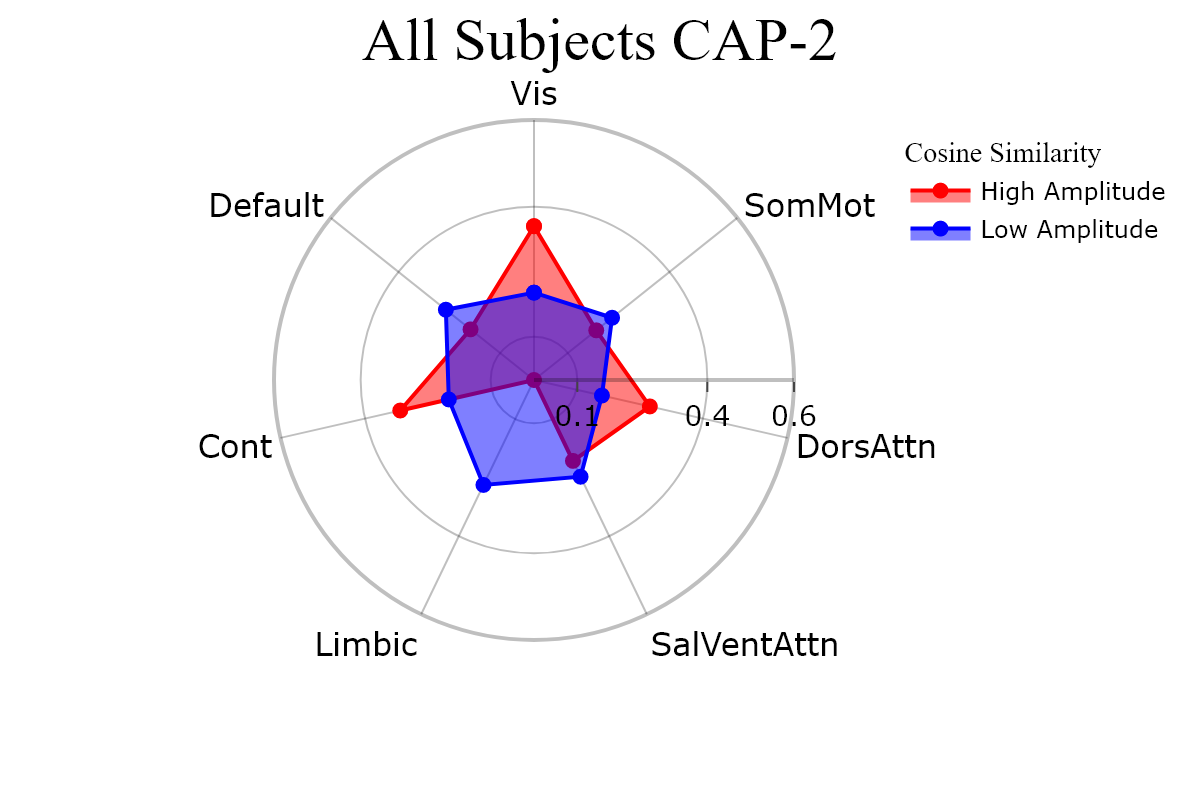
Plotting CAPs to Radar#
radialaxis = {
    "showline": True,
    "linewidth": 2,
    "linecolor": "rgba(0, 0, 0, 0.25)",
    "gridcolor": "rgba(0, 0, 0, 0.25)",
    "ticks": "outside",
    "tickfont": {"size": 14, "color": "black"},
    "range": [0, 0.6],
    "tickvals": [0.1, "", "", 0.4, "", "", 0.6],
}

legend = {
    "yanchor": "top",
    "y": 0.99,
    "x": 0.99,
    "title_font_family": "Times New Roman",
    "font": {"size": 12, "color": "black"},
}

colors = {"High Amplitude": "red", "Low Amplitude": "blue"}

kwargs = {
    "radialaxis": radial,
    "fill": "toself",
    "legend": legend,
    "color_discrete_map": colors,
    "height": 400,
    "width": 600,
}

cap_analysis.caps2radar(**kwargs)